
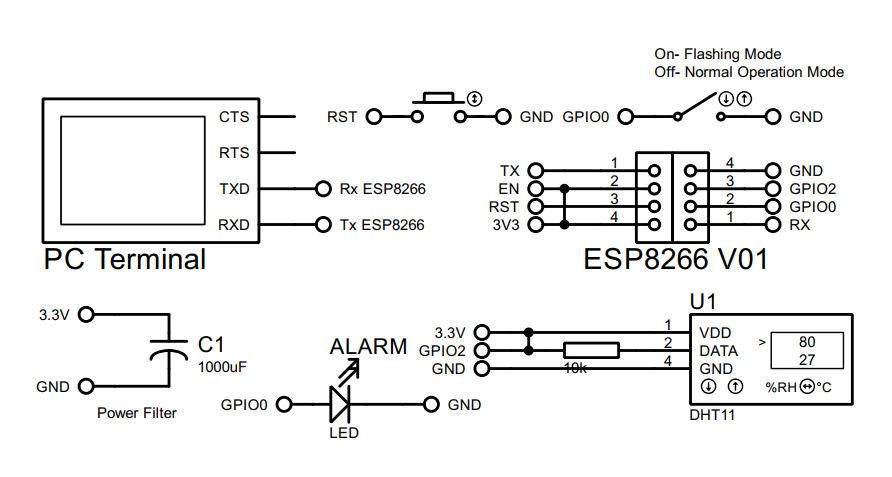
In our daily life we have either whatsapp or telegram or messenger etc for communicating platform. You can use any of those to communicate media with your ESP module. In this article we use whatsapp to display DHT11 sensor data. For security reason we introduce a KEY word. Let’s begin with ESP01 module since it has low cost with 2 GPIO. First look at the connection diagram-
First go to the following website & follow the process. – > https://whatabot.io/get-started
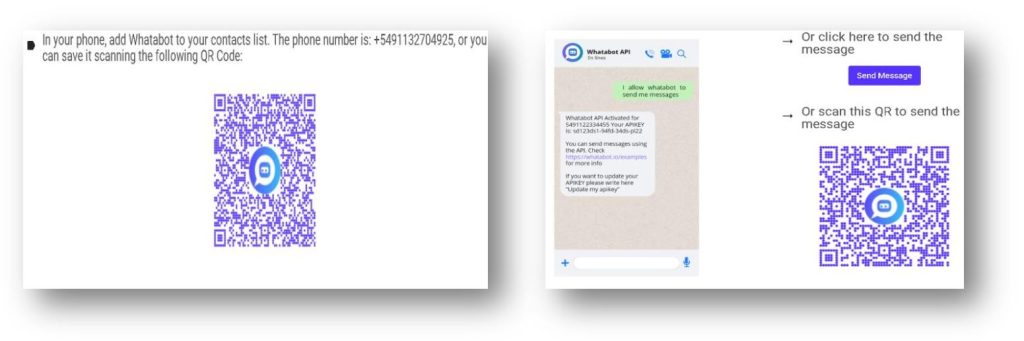
- send a WhatsApp message with the following text: “I allow whatabot to send me messages”
For full procedure please watch my YouTube Video or simply go to the following site- https://github.com/WhatabotAPI/WhatsappArduino
Now it times to download some driver for our project. Let’s begin with some settings-
- Install the latest version of Arduino : https://www.arduino.cc/en/software/
- In Arduino: File>Preferences>Setting
http://arduino.esp8266.com/stable/package_esp8266com_index.json
- In Arduino Install: Tools>Board>esp8266
- In Arduino: Tools>Board>esp8266>Generic ESP8266 Module
- In Arduino Install: Library Manager
- WiFiManager
- DHT sensor library
- ArduinoJson
- WiFiManager
One Additional but important library –
The main program as follow-
#include <WhatabotAPIClient.h>
#include <WiFiManager.h>
#include <DHT.h>

#define WHATABOT_API_KEY "Your_API_Key"     // Your WhataBoT API Key
#define WHATABOT_CHAT_ID "8801XXXXXXXXX"    // Your Phone Number Without+
#define WHATABOT_PLATFORM "whatsapp"        // Fixed String

WiFiManager wifiManager;
WhatabotAPIClient whatabotClient(WHATABOT_API_KEY, WHATABOT_CHAT_ID, WHATABOT_PLATFORM);

//If you dont want to use WiFiManager you can still connect to WiFi using other logic.
#define AP_SSID "Your_WiFi_Name"            // Your WiFi Name
#define AP_PASS "Your_WiFi_passord"         // Your WiFi Password

#define DHTPIN 2     // GPIO2 of ESP01
#define DHTTYPE DHT11
DHT dht(DHTPIN, DHTTYPE);

void setup() {
  dht.begin();
  Serial.begin(115200);
  //wifiManager.autoConnect(AP_SSID, AP_PASS); // You Can Use This function
  WiFi.begin(AP_SSID, AP_PASS);
  Serial.print("Connecting to WiFi");
  while (WiFi.status() != WL_CONNECTED) {
    delay(500);
    Serial.print(".");
  }
  whatabotClient.begin();
  whatabotClient.onMessageReceived(onMessageReceived);
  whatabotClient.onServerResponseReceived(onServerResponseReceived);
}

void loop() {
  whatabotClient.loop();
}

void onServerResponseReceived(String message) {
  Serial.println(message);
}

void onMessageReceived(String message) {
  Serial.println(message);
  float humidity = dht.readHumidity();
  float temperature = dht.readTemperature();
  int IsDisplay = message.compareTo("display");   // You Can Change Your Key
  if(IsDisplay==0) whatabotClient.sendMessageWS("🌡 Temp: " + String(temperature, 2) + "°C\n💧 Humidity: " + String(humidity, 2)+"%");
  else whatabotClient.sendMessageWS("Sorry Wrong Key");
}
Here you have to enter your full SIM number without + sign. Since I live in Bangladesh so I use 880 as my country code, India 91, Pakistan 92, Nepal 977 , Sri Lanka 94, USA 1 , UAE 971 etc. Remember WhatABoT phone number +5491132704925 need to save with + sign, otherwise BOT will not active. Run the program & have fun.


 IoTthingHuB


 Visit Today : 57
 Total Visit : 41173