
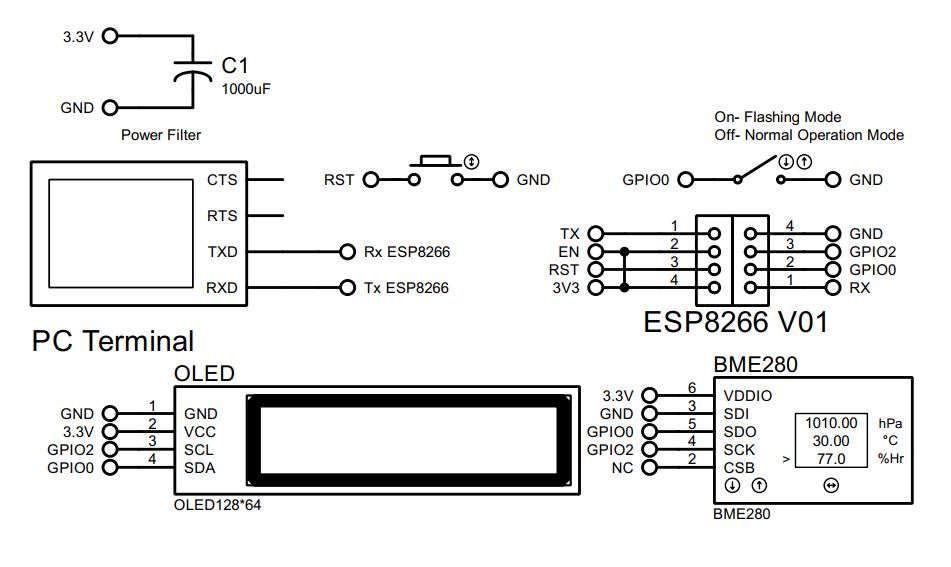
In this article we interface I2C temperature, humidity & pressure sensor BME280 with esp01. We already interface esp01 with STM32 in AT command mode previously. Since esp01 along can handle I2C device so no need for an external microcontroller. We use OLED display for display sensor data on screen & store value in ThingSpeak Server. Go to thingSpeak website & create a channel after successful registration. Since we only write data to thingSpeak cloud, after successfully creating a channel with fields you can have-
Write a Channel Feed
GET https://api.thingspeak.com/update?api_key=={API key}&field1=0
Since it is a GET method we can check it directly into a browser for updating the value without Postman Application. Let’s continue with our project. Here
- Field 1 : temperature : Temperature BME280 : Celsius (°C)
- Field 2 : humidity : Humidity BME280 : %
- Field 3 : pressure : Air pressure BME280 : hPa
- Field 4 : altitude : Altitude BME280 : m
- Field 5 : heatIndex : Heat Index : Celsius (°C)
Now it times to download some driver for our project. Let’s begin with some settings-
- Install the latest version of Arduino : https://www.arduino.cc/en/software/
- In Arduino: File>Preferences>Setting
http://arduino.esp8266.com/stable/package_esp8266com_index.json
- In Arduino Install: Tools>Board> esp8266
- In Arduino: Tools>Board>esp8266>Generic ESP8266 Module
- In Arduino Install: Library Manager
- Adafruit SSD1306
- Adafruit GFX Library
- Adafruit BusIO
- Adafruit BME280
- Adafruit SSD1306

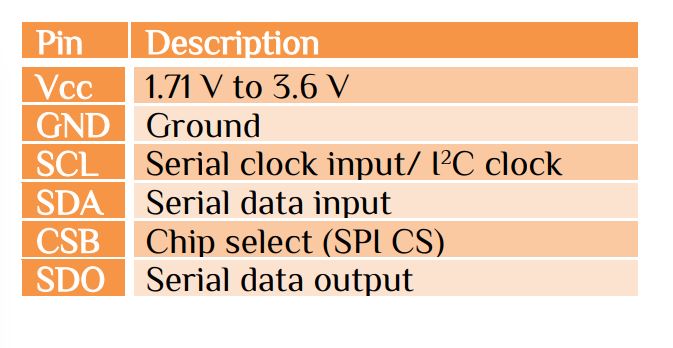
BME280 can operate in 3 different modes, i.e. sleep mode, normal mode & forced mode. The I²C slave BMP280 has 7-bit device address of 111011x. The 6 MSB bits are fixed. The last bit is changeable by SDO value and can be changed during operation. Connecting SDO to GND results in slave address 1110110 (0x76); connection it to VDDIO results in slave address 1110111 (0x77). The Adafruit BME280 library handles all the parameter.
#include <Wire.h>
#include <Adafruit_Sensor.h>
#include <Adafruit_BME280.h>
// Use ESP-01 available pins for I2C
#define SDA_PIN 0          // GPIO0 for SDA
#define SCL_PIN 2          // GPIO2 for SCL
// BME280 sensor
Adafruit_BME280 bme;
// Set I2C to use GPIO0 (SDA) and GPIO2 (SCL)
Wire.begin(SDA_PIN, SCL_PIN);
// Init BME280 SDO connected to GND
if (!bme.begin(0x76)) {
    display.println("BME280 error");
    display.display();
    while (1);
  }
// the parameters
float temperature = bme.readTemperature();
float humidity = bme.readHumidity();
float pressure = bme.readPressure() / 100.0F;
float altitude = bme.readAltitude(1013.25);
Since we want to display data in OLED, the controlling of OLED as-
#include <Wire.h>
#include <Adafruit_GFX.h>
#include <Adafruit_SSD1306.h>
// Use ESP-01 available pins for I2C
#define SDA_PIN 0          // GPIO0 for SDA
#define SCL_PIN 2          // GPIO2 for SCL
// OLED display
#define SCREEN_WIDTH 128   // Adjust Width
#define SCREEN_HEIGHT 64   // Adjust Height
#define OLED_RESET -1      // Since No Reset Pin
Adafruit_SSD1306 display(SCREEN_WIDTH, SCREEN_HEIGHT, &Wire, OLED_RESET);
// Set I2C to use GPIO0 (SDA) and GPIO2 (SCL)
  Wire.begin(SDA_PIN, SCL_PIN);
  // Initialize OLED
  if (!display.begin(SSD1306_SWITCHCAPVCC, 0x3C)) {
    Serial.println("OLED init failed");
    delay(10000);
    while (1);
  }
The final step is to send data to ThingSpeak Cloud. The program for sending data-
const char* host = "api.thingspeak.com";
const char* writeAPIKey = "Your_API_Key"; // provide your Write API Key
WiFiClient client;
// ThingSpeak
  if (client.connect(host, 80)) {
    String url = String("/update?api_key=") + writeAPIKey +
                 "&field1=" + tStr +
                 "&field2=" + hStr +
                 "&field3=" + pStr +
                 "&field4=" + aStr +
                 "&field5=" + hiStr;

    client.print(String("GET ") + url + " HTTP/1.1\r\n" +
                 "Host: " + host + "\r\n" +
                 "Connection: close\r\n\r\n");

    Serial.println("Sent to ThingSpeak");
    display.setCursor(0, 56);
    display.println("Sent to ThingSpeak");
    display.display();
  } else {
    Serial.println("Send failed");
    display.setCursor(0, 56);
    display.println("Send failed");
    display.display();
  }
Here we introduce another term Heat Index. The heat index, also known as the apparent temperature, is what the temperature feels like to the human body when relative humidity is combined with the air temperature. This has important considerations for the human body’s comfort
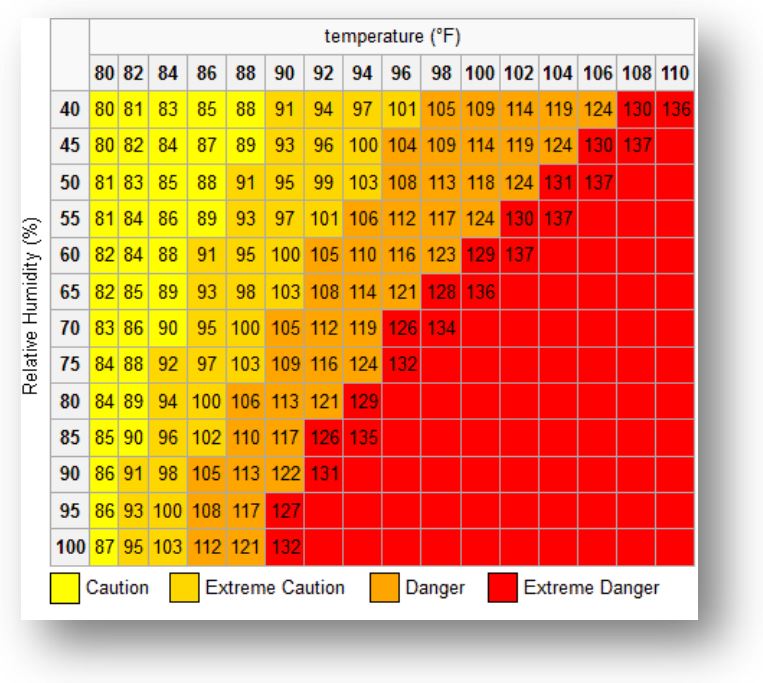
float computeHeatIndex(float tempC, float humidity)
{
  // Convert Celsius to Fahrenheit
  float tempF = tempC * 9.0 / 5.0 + 32.0;
  float hiF = -42.379 + 2.04901523 * tempF + 10.14333127 * humidity
              - 0.22475541 * tempF * humidity - 0.00683783 * tempF * tempF
              - 0.05481717 * humidity * humidity + 0.00122874 * tempF * tempF * humidity
              + 0.00085282 * tempF * humidity * humidity
              - 0.00000199 * tempF * tempF * humidity * humidity;

  // Convert back to Celsius
  return (hiF - 32) * 5.0 / 9.0;
}


 IoTthingHuB


 Visit Today : 57
 Total Visit : 41173