
USART stands for Universal Synchronous Asynchronous Transmitter and Receiver in which a packet of data enclosed in an envelope of start and stop bit. Synchronous means that single clock source would be shared by end devices to facilitate communication and asynchronous means, there would be no synchronous clock source would be the end of the device. To allow the communication between two devices we need to decide a bound rate. Here bound rate is the speed of your communication and is measured in bits per second. Let’s look at the USART register available in AVR and there uses-
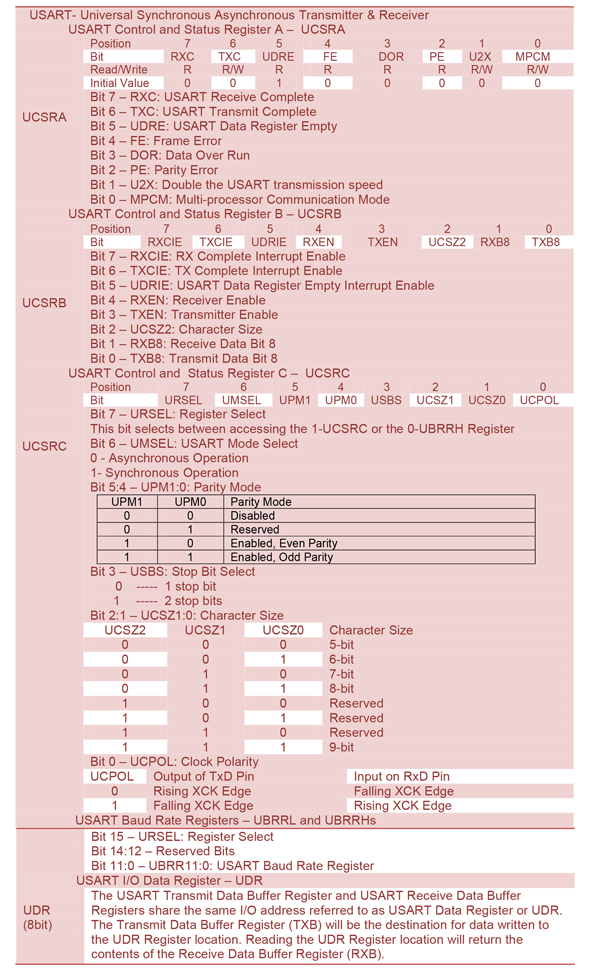
Initialize USART
Initialize USART is very simple. Just initialize the following condition

Thus for BAUD RATE=9600 with F_CPU=8MHz, the UBRR value is 51. If U2X bit is enabled then simply multiply 2 with UBRR value.
- Enable Transmit or Receive mode with either Synchronous or Asynchronous operation
- Select the character frame size with parity and stop bit.
Let’s enable USART mode with BAUD RATE=9600, F_CPU=8MHz, Asynchronous mode, 8 bit character with no parity and 1 stop bit. From the above calculation UBRR=51.
void usart_init(void)
{
  UBRR0=(uint8_t)51; //UBRR0H=0;
  /******  Asynchronous mode, 8 bit character with no parity and 1 stop bit *******/
  UCSRB|=(1<<RXEN)|(1<<TXEN);
  UCSRC|=(1<<URSEL)|(1<<UCSZ1)|(1<<UCSZ0); //For UCSRC register selection URSEL bit is set.
}
Send individual indications
Since the UDR register is full duplex, data can be transmitted by writing this register and data can be received by reading this register. To send data just write the data to UDR and it automatically send via AVR Tx pin. Now wait until the transmission complete either checking the TXC or UDRE bit in UCSRA register. Since the flag register is set when data send completed. So the checking condition is
UDR=ByteToSend;
while(!(UCSRA&(1<<TXC)))
{
;// wait until data send
}
OR
UDR=ByteToSend;
while(!(UCSRA&(1<<UDRE)))
{
;// wait for possible sending
}
- Send character
Function call: usart_putc(‘c’);
Function definition:
void usart_putc(unsigned char c)
{
  while(!(UCSRA&(1<<UDRE)));
  UDR=c;
  while(!(UCSRA&(1<<UDRE)));
}
- Send string
Function call: usart_puts(“Send string”);
Function definition:
void usart_puts( char *star)
{
  while(*star)
   {
     usart_putc(*star);
     star++;
   }
}
- Send signed 16 bit integer(int16_t)
Function call: usart_puti16(-123);
Function definition:
void usart_puti16(int16_t a)
{
  char s[20];
  itoa(a,s,10);
  usart_puts(s);
}
- Send signed 16 bit integer(uint16_t)
Function call: usart_puti16(123);
Function definition:
void usart_putui16(uint16_t a)
{
  char s[20];
  utoa(a,s,10);
  usart_puts(s);
}
- Send signed 32 bit integer(int32_t)
Function call: usart_puti32(-12345);
Function definition:
void usart_puti32(int32_t a)
{
 char s[20];
 ltoa(a,s,10);
 usart_puts(s);
}
- Send signed 32 bit integer(uint32_t)
Function call: usart_putui32(12345);
Function definition:
void usart_putui32(uint32_t a)
{
  char s[20];
  ultoa(a,s,10);
  usart_puts(s);
}
- Send float
Function call: usart_putf(3.23);
Function definition:
void usart_putf(float f)
{
  char s[20];
  dtostrf(f,19,3,s); //19 is the string limit & 3 is after period(.)
  usart_puts(s);
}
The conversion is more complicated to memorize. In that case you can use sprintf(string,”Convertion”,variables) function which is available in #include<stdio.h>
  #include<stdio.h>
  char usart[20];
  /****convert whatever data type you want to string******/
  sprintf(usart,”%x”,your_data);
  usart_puts(usart);
Receiving Indication
Since UDR register is full duplex, we can receive data through UDR register. In this case we first check if any data available. This can be done with the help of RXC flag register.
Function call: char c=usart_getc();
Function definition:
char usart_getc(void)
 {
  while(!(UCSRA&(1<<RXC)))
   {
     ; //wait until receive complete
   }
  return UDR;
 }
Let’s make a program to display ADC value of AVR to PC with the help of USART feature. In this program ADC value will be display if enter pressed. In this section we just show the result in Proteus VIRTUAL TERMINAL with parameter Baud Rate : 9600, Data Bits : 8, Parity : NONE & Stops Bits : 1 . The program is very simple, look at the coding and it will be easier to understand.
  #include<avr/io.h>
  #include<util/delay.h>
  #include<stdio.h>
  #include"usart.h"
  #include"adc.h"
int main(void)
  {
   usart_init();
   adc_init();
   usart_puts("********************************************\r");
   usart_puts("*********   shani kumar sarkar   ***********\r");
   usart_puts("*********   Read ADC value       ***********\r");
   usart_puts("********************************************\r");
   usart_puts("\r press enter to get ADC value\r");
  while(1)
    {
     if(usart_getc()=='\r')
	   {
		usart_puti16(read_adc(0));
		usart_putc('\r');
	   }
    }
 return 0;
}


 IoTthingHuB


 Visit Today : 58
 Total Visit : 41174