
In GSM networking topology SIM (Subscriber Identity Module) is the key. In this article we use sms (short message service) to control load. For SIM reading we use module SIM900A GSM module. First look the connection diagram-
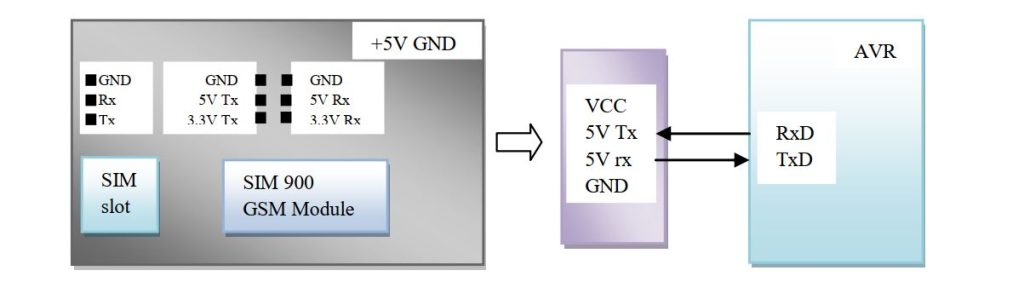
For transmission data the basic format is-

Here, <CR> Carriage Return (‘\r’ or 0x0D) – moves the cursor to the beginning of the line without advancing to the next line.
<LF> Line feed (‘\n’ or 0x0A) – moves the cursor down to the next line without returning to the beginning of the line.
There are different commands for different function. We need only some. The SIM900 module come with default 9600 baud rate, 8 bit characters, no parity bit and one stop bit. First look at some basic commands.

Let’s first start with SIM9000 and send some call in/call out function. We check the SIM is working or not and generate or received a call.
void sim_check(void) -> Check if SIM900A is present or not
BEGAIN:
    usart_puts("AT\r\n");//Response OK
	_delay_ms(500);
	buffer=strstr(receive,"OK");
	if(buffer[0]=='O' && buffer[1]=='K')
	LCD_write_string(1,1,"GSM Module found");
	else
	goto BEGAIN;
	cont=0; //initial counter
	usart_puts("ATE0\r\n");//Echo mode deactivate
void SM_CALL_IN(char *mobile_number) -> call in function
volatile char display[17];
sprintf(display,"ATD%s;\r\n",mobile_number);
usart_puts(display);
void SM_CALL_HALT(void) -> Terminate call
usart_puts("ATH\r\n");
void SM_CALL_RECEIVE(void) -> Receive all call
usart_puts("ATA\r\n");
Whenever we transmit a string the device response with final 0x0D 0x0A character. Initialize UART with Rx transmission interrupt enable. In Rx interrupt service routine use a global variable to received context.
ISR(USART_RXC_vect) -> Rx service routine global variable receive, cont
receive[cont++] = UDR; //Read the data from buffer
UCSRA|=(1<<RXC); //Clear the interrupt flag
Our main target is to control load using SMS, so let look at the command need for SMS function.

Whenever a massage received the device with +CMTI: “SM”,1 – a massage received response number 1 and “SM” is the SIM memory. To read the massage just send “AT+CMGR=1\r\n” string. Function to display SMS and Number on the LCD display-
void SM_READ_MSG(void) -> Read SMS and shows the SMS received number
volatile uint8_t len,num_msg;
volatile char test[20],*buffer,display[120],number[12],msg[80];
  if(strstr(receive,"CMTI")){
      LCD_Clear();
      cont=0; //initial counter
      sprintf(test,"AT+CMGR=%d\r\n",num_msg);
      usart_puts(test);//Read SMS
      sprintf(display,"%s",receive);
      if(strstr(display,"READ")){
            for(uint8_t i=0;i<=120;i++){
                 if(display[i]=='+' && display[i+1]=='8' && display[i+2]=='8'){
                      for(uint8_t j=0;j<11;j++)
                      number[j]=display[i+3+j]; //11 digit number
                      }
                 if(i>40 && display[i]=='\r'){
                      for(uint8_t k=0;k<40;k++)
                      msg[k]=display[i+k+2];        //sms display
                      break;
                }
            }
    }
  LCD_write_string(1,1,number);
  LCD_write_string(1,2,msg);
In the function you get the mobile number and the text of the massage. You can do any function according to the number and text massage. Connect SIM900A module with ATmega8, use a SIM. Send “Load1 on” to turn on load 1 and “Load1 off” to off the load1. Send “Load2 on” to turn on load 2 and “Load2 off” to off the load2.

You can simulate in proteus COMPIM terminal. The terminal is same as PuTTy or realturm terminal. Just connect the SIM module with PC via CP2101 or similar device. Then in proteus you can see the real time tracking.


 IoTthingHuB


 Visit Today : 58
 Total Visit : 41174