
Biometric sensor has Hugh application in security, attendance etc. We use R307 Fingerprint Module. R307 Fingerprint Module consists of optical fingerprint sensor, high-speed DSP processor. Fingerprint processing includes two parts: fingerprint enrollment and fingerprint matching (the matching can be 1:1 or 1:N). When enrolling, user needs to enter the finger two times. The system will process the two time finger images, generate a template of the finger based on processing results and store the template. When matching, user enters the finger through optical sensor and system will generate a template of the finger and compare it with templates of the finger library. For 1:1 matching, system will compare the live finger with specific template designated in the Module; for 1:N matching, or searching, system will search the whole finger library for the matching finger. In both circumstances, system will return the matching result, success or failure. First look at the connection.
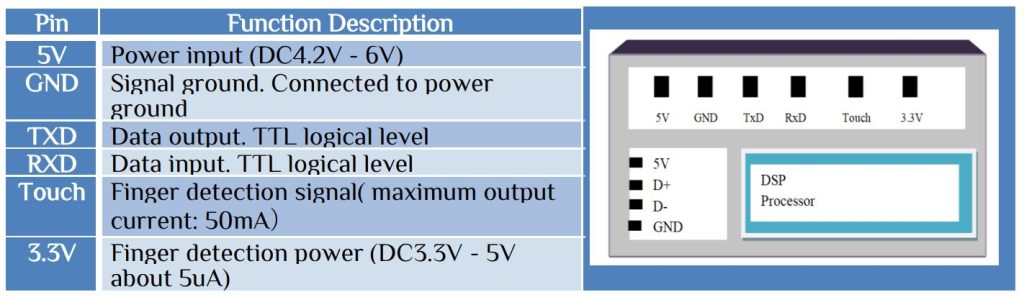
It can support various baud rate 9600, 19200, 28800, 38400, 57600. Here the default baud rate 57600. The basic data packet format-

Some of the important packets are-

To generate character file from image, we have BufferID of charBuffer1 address 1h and charBuffer2 address 2h. Both charBuffer1 & charBuffer2 are size of 512bytes.

To store the template in your desire ID is-

Here buffer1 0x01 and buffer2 0x02. Page ID is your desire ID number, maximum number of ID = 1000.


Acknowledge package format.

Here the 9th bit represents the error or success. Loot at some error code-
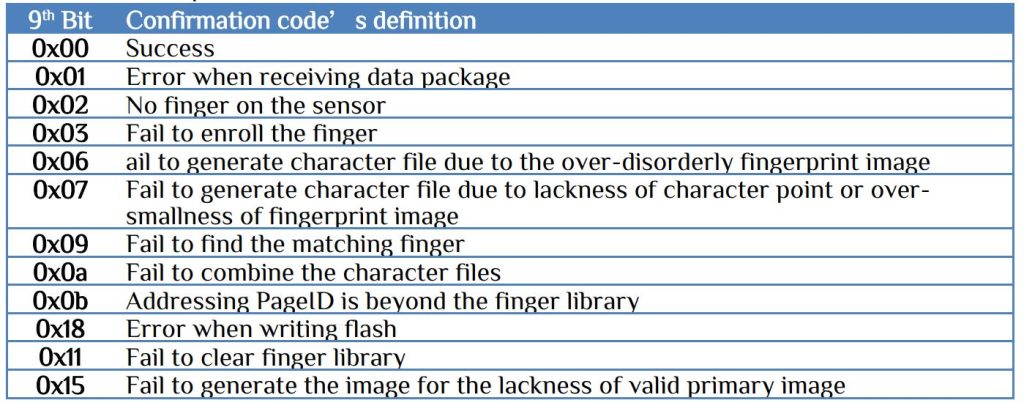
There are some other errors that can be found from the datasheet. To use different function you need different steps.
For Enroll your finger following steps are necessary-
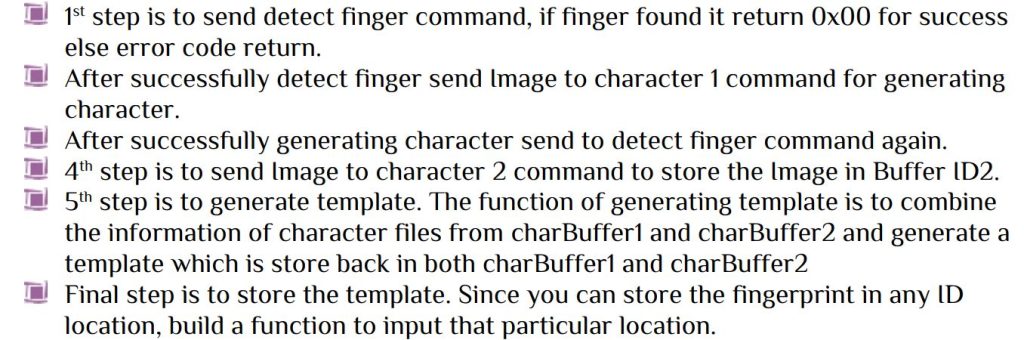
Using the above procedure you can store fingerprint data in any PageID. Now for searching your ID which is placed in finger sensor-


Here the 10th bit is Higher bit value and 11th bit s the Lower bit value. Those 2byte represent the match ID.
For delete a particular ID just send delete template command with Page ID (your desire ID) and number of template to be deleted 0x0001. i.e. for deleting ID = 1
0xEF, 0x1, 0xFF, 0xFF, 0xFF, 0xFF, 0x1, 0x00, 0x7, 0xC, 0x0, 0x0, 0x0, 0x1, 0x0, 0x15
For empty all library just send the empty command. i.e.
0xEF, 0x1, 0xFF, 0xFF, 0xFF, 0xFF, 0x1, 0x00, 0x3,0xd,0x0,0x11
We use ATmega32 for fingerprint sensor interfacing. Use fuse bit for internal 8MHz oscillator setting. F_CPU 8MHz and baud rate 57600. LCD Connected to PORTB, PC0 pin for selection, PC1 for arrow ↑ and PC2 arrow ↓. There are four functions-

You can simulate in proteus COMPIM terminal. The terminal is same as PuTTy or realturm terminal. Just connect the F307 module with PC via CP2101 or similar device. Then in proteus change the COM port according to the COM port which the module connect then you can see the real time working.


 IoTthingHuB


 Visit Today : 58
 Total Visit : 41174
1 thought on “R307 Fingerprint Module”
Comments are closed.