
The universal synchronous asynchronous receiver transmitter (USART) offers a flexible means of Full-duplex data exchange with external equipment requiring an industry standard NRZ asynchronous serial data format. The USART offers a very wide range of baud rates using a programmable baud rate generator.
It supports synchronous one-way communication and Half-duplex Single-wire communication, as well as multiprocessor communications. It also supports the LIN (Local Interconnect Network), Smartcard protocol and IrDA (Infrared Data Association) SIR ENDEC specifications and Modem operations (CTS/RTS). High speed data communication is possible by using the DMA (direct memory access) for multi-buffer configuration. For the basic USART function please read my 👉 ATmel section. STm32 offer its own Hal library for fully control UASRT protocol. Some basic library as follow-
HAL_UART_Transmit(UART_HandleTypeDef *huart, const uint8_t *pData, uint16_t Size, uint32_t Timeout);
HAL_UART_Receive(UART_HandleTypeDef *huart, uint8_t *pData, uint16_t Size, uint32_t Timeout);
HAL_UART_Transmit_IT(UART_HandleTypeDef *huart, const uint8_t *pData, uint16_t Size);
HAL_UART_Receive_IT(UART_HandleTypeDef *huart, uint8_t *pData, uint16_t Size);
HAL_UART_Transmit_DMA(UART_HandleTypeDef *huart, const uint8_t *pData, uint16_t Size);
HAL_UART_Receive_DMA(UART_HandleTypeDef *huart, uint8_t *pData, uint16_t Size);
HAL_UART_DMAPause(UART_HandleTypeDef *huart);
HAL_UART_DMAResume(UART_HandleTypeDef *huart);
HAL_UART_DMAStop(UART_HandleTypeDef *huart);
In this article we will make a fingerprint lock system for squire entry. Please go through my 👉 R307 Fingerprint module article in ATmel section. For fingerprint sensor I use AS608 biometric sensor works similar as R307 module.
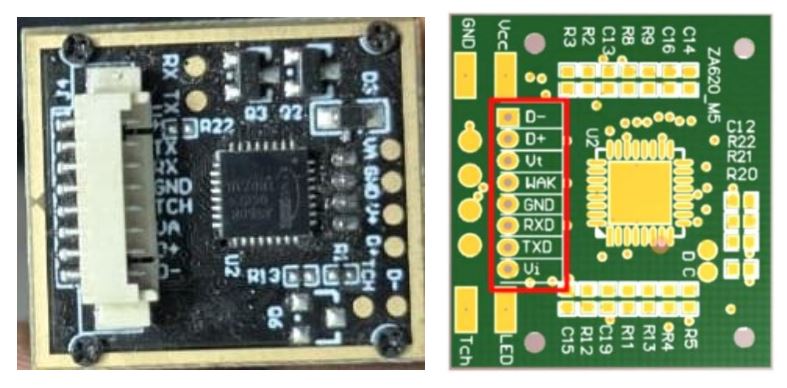
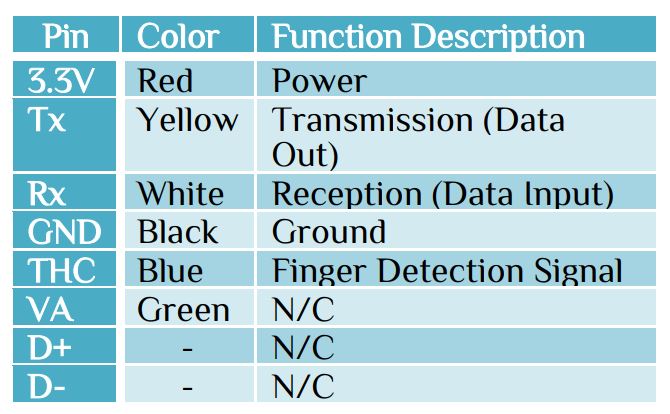
It has baud rate range from 9600~57600, but default baud rate is 57600. Both for transmission & receive needs more purity, so we use interrupt function for both Rx & Tx. Initialize USART with 8bit, 1 stop bit & none parity bit with global interrupt enable. For display purpose we use OLED display. We use RTC for time & date. In our while loop we normally wait for any finger placed on biometric sensor. If any finger place on the sensor it will search in the library. If finger found in the library it will display a pass logo to the OLED and a GPIO pin will active for 1min to turn the relay. If finger not found in the library it will display a logo of not recognized & back to the search again. The delay time is 6s for recognition a finger.
At first we have to enroll finger and give a ID to that finger. For this purpose let’s use 3 GPIO pin. The setting will be 2:2:2 for access the function.
#define SELECTION      HAL_GPIO_ReadPin(GPIOA, GPIO_PIN_0)
#define ARROW_UP       HAL_GPIO_ReadPin(GPIOA, GPIO_PIN_1)
#define ARROW_DOWN     HAL_GPIO_ReadPin(GPIOA, GPIO_PIN_2)
uint8_t digit_1,digit_2,digit_3

if(!SELECTION){ digit_1++; HAL_Delay(1); if(digit_1==10) digit_1=0;}
if(!ARROW_UP && digit_1==2) {digit_2++; HAL_Delay(1);if(digit_2==10) digit_2=0;}
if(!ARROW_DOWN && digit_1==2 && digit_2==2){digit_3++; HAL_Delay(1);if(digit_3==10) digit_3=0;}
sprintf(display_time,"Setting %d:%d:%d  ",digit_1,digit_2,digit_3);
OLCD_write_string(7,0,display_time);
    if(digit_3==2){
			setting_bit=1;digit_1=0;digit_2=0;digit_3=0;
			OLCD_write_string(7,0,"S. M. Activate  ");
			selectFunc();
		     }
Here we use GPIOA pin 0,1,2 for setting parameter. When we enter setting those pin are also use for
- Selection Function. i.e. Enroll function, Delete/Enter ID number or Empty library
- ARROW up for ID number increment or function selection
- ARROW down for ID number decrease or function selection
#define ENROLL         1
#define DELETE_ID      2
#define EMPETY_FP_LIB  3
void selectFunc(void)
{
	OLCD_write_string(6,0,"Select <- ->  ");
	HAL_Delay(100);
while(SELECTION) // Pin for selection finger
	{
	if(!ARROW_UP) // For Up Arrow
	   {
			scan++;
			HAL_Delay(200);
			if(scan>=4) scan=1;
			switch(scan)
		  {
			case ENROLL: OLCD_write_string(7,0,"ENROLL UR FINGER");
			break;
			case DELETE_ID: OLCD_write_string(7,0,"DELETE ID NO    ");
			break;
			case EMPETY_FP_LIB: OLCD_write_string(7,0,"EMPTY LIBRARY   ");
			break;
		  }
	   }
	else if(!ARROW_DOWN)
	   {
			scan--;
			HAL_Delay(200);
			if(scan==0) scan=3;
			switch(scan)
		  {
			case ENROLL: OLCD_write_string(7,0,"ENROLL UR FINGER");
			break;
			case DELETE_ID: OLCD_write_string(7,0,"DELETE ID NO    ");
			break;
			case EMPETY_FP_LIB: OLCD_write_string(7,0,"EMPTY LIBRARY   ");
			break;
		  }
	   }
	}
HAL_Delay(200);
switch(scan)
{
	case ENROLL: enroll();
	break;
	case DELETE_ID: sendcmd2fp(FP_delete);
	break;
	case EMPETY_FP_LIB: sendcmd2fp(FP_empty);
	break;
}
}
R307 Fingerprint module article describes how to create those libraries. Example, let’s make a function to verify if the sensor connected or not.
const char fp_VfyPwd_Tx[16]={0xEF, 0x1,0xFF, 0xFF, 0xFF, 0xFF,0x1, 0x00,0x7, 0x13, 0x00, 0x00, 0x00, 0x00, 0x00, 0x1B };
char recive[20], rx_char, arr_size;
HAL_UART_Receive_IT(&huart1,&rx_char,1);
	while(1)
	{
	  OLCD_write_string(0,0,"Searching...  ");
	  arr_size = (sizeof(fp_VfyPwd_Tx)) / sizeof((fp_VfyPwd_Tx)[0]);
      HAL_UART_Transmit_IT(&huart1,&fp_VfyPwd_Tx,arr_size);
	  HAL_Delay(1000);
	  if(recive[9]) OLCD_write_string(0,0,"Connect Device"); // Device not connected
	  else   {
			OLCD_write_string(0,0,"Device Found");
			HAL_Delay(2000);
			clear_display();
			logo_write(1); // Finger Print Sensor Logo
			HAL_Delay(5000);
			clear_display();
			break;
		}
	}
In return function we have-
extern UART_HandleTypeDef huart1;
void HAL_UART_RxCpltCallback(UART_HandleTypeDef *huart)
{
  if(huart->Instance==USART1 )
  {
    recive[cont++]=rx_char;
    HAL_UART_Receive_IT(&huart1,&rx_char,1);
  }
}
Here we display a logo in OLED. Display a logo in OLED is to just send a data stream to OLED. Please see my 👉 OLED (SSD1306) interface article in ATmel section for more information about OLED. To interface any STm32 please see the video tutorial, it will also help you to know about configuration, different header file interface. Since it is a long program we can’t cover in a single article, but the basic was explained here.


 IoTthingHuB


 Visit Today : 58
 Total Visit : 41174