
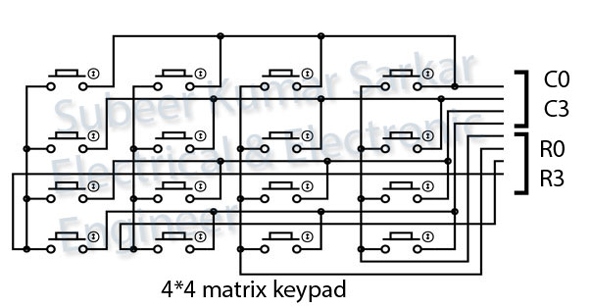
Here the RAWs R0 to R3 are connected to the input lines of µC and C0 to C3 are connected to output terminal of the output port. The inputs are active when logic zero that is internal pull up active and the column port are high at that position. The logic is the output port is continuously set and clear and when a switch is the corresponding PIN of output port is low other two pins are high at that time.
Let consider the following picture-
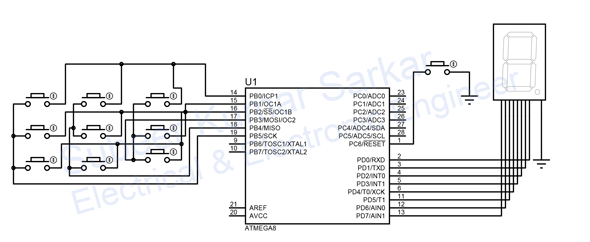
Suppose that if we connect the pins according to the matrix keypad where PIN[0-2] as output, PIN[3-5] as input and internal pull up active, the generated code will be –

Let’s build a simplified model to generate any matrix keypad using one port only is bellow-

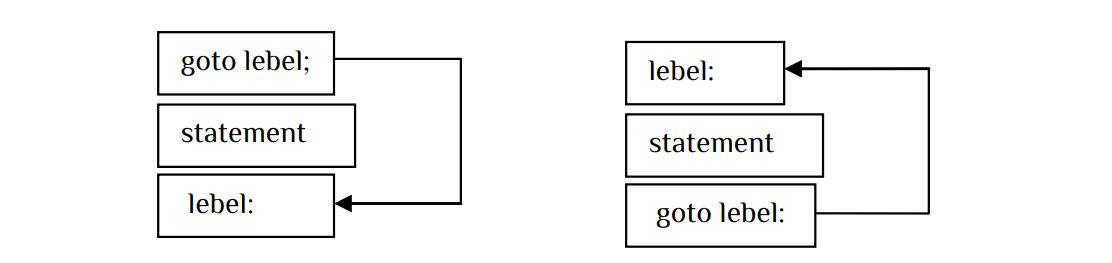
goto function:-
goto statement is used for jumping into the C program. It can be forward jump or backward jump.
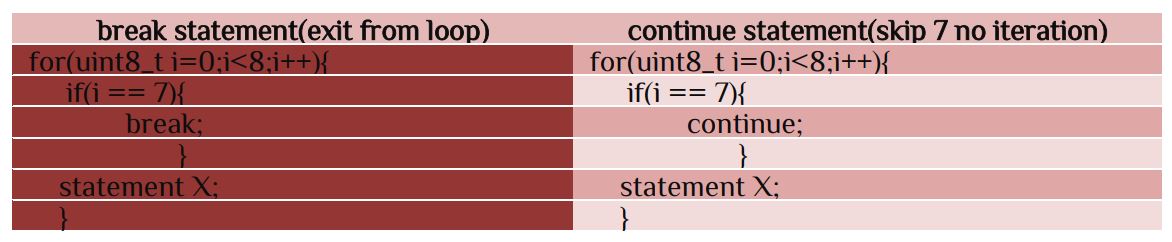
break and continue statements:
Both break and continue statement is used into a loop. Both has significant impact into the loop. The break statement is used for exit from a nested loop. The continue statement break one iteration (in a loop) if a specified condition occurs and continues with the next iteration in the loop.
C:>
unsigned char press,keycode,keyPress,i;
unsigned char key_press(unsigned char maximum_value)
/*******for 4×4 matrix keypad, the maximum value= 0xff *************/
for(i=0;i<column;i++){
_delay_ms(1); // delay for I/O port setting
PORTx=[maximum value] & (~(0x01<<i));
_delay_ms(1); // delay for I/O port setting
press=PINx|[maximum column value];
if(press != maximum value)
_delay_ms(20); //key debouncing delay
press=PINx|[maximum column value];
if(press==[maximum value]) goto OUT;
keycode=(press & [maximum row value])|(maximum column value)& [maximum value] & (~(0x01<<i));
while(press !=[maximum value])
press=PINx|[maximum value];
_delay_ms(20); //key debouncing delay
switch(keycode)
case (PORTx value when switch press) : KeyPress=’charecter’/number;
break;
—————
} //end of switch
OUT:;
}//end of if
}//end of for
return (keyPress);

unsigned char key_press(unsigned char press)
{
for(i=0;i<3;i++)
	{
	_delay_ms(1);
	KB_PORT_OUT=0x7f &(~(0x01<<i));
	_delay_ms(1);
	press=KB_PORT_IN | 0x07;
	if(press != 0x7f)
	{
	_delay_ms(20);
	press=KB_PORT_IN | 0x07;
	if(press == 0x7f) goto OUT;
	keycode=(press& 0x78) |(0x07 & (0x7f &(~(0x01<<i))));
	while(press != 0x7f)
	press=KB_PORT_IN | 0x07;
	_delay_ms(20);
	switch(keycode)
		{
			case (0x76): keyPressed = '1';
				 		 break;
			case (0x6e): keyPressed = '4';
				 		 break;
			case (0x5e): keyPressed = '7';
			   			 break;
			case (0x3e): keyPressed = '*';
				 		 break;
			case (0x75): keyPressed = '2';
				 		 break;
			case (0x6d): keyPressed = '5';
				 		 break;
			case (0x5d): keyPressed = '8';
				 		 break;
			case (0x3d): keyPressed = '0';
				 		 break;
			case (0x73): keyPressed = '3';
				 		 break;
			case (0x6b): keyPressed = '6';
				 		 break;
			case (0x5b): keyPressed = '9';
				 		 break;
			case (0x3b): keyPressed = '#';
				 		 break;
		}
		OUT:;
	}
	}

return (keyPressed);
}
The similar technique can be applied to all keypads. We only tested it in 3×3, 3×4, 4×3, 4×4 matrix keypad and works fine. To use this keypad header files all you need is set Keypad lower order bits as output port and lower higher order bit to input pin. For your simplicity here is a simple program of 4×4 matrix keypad.
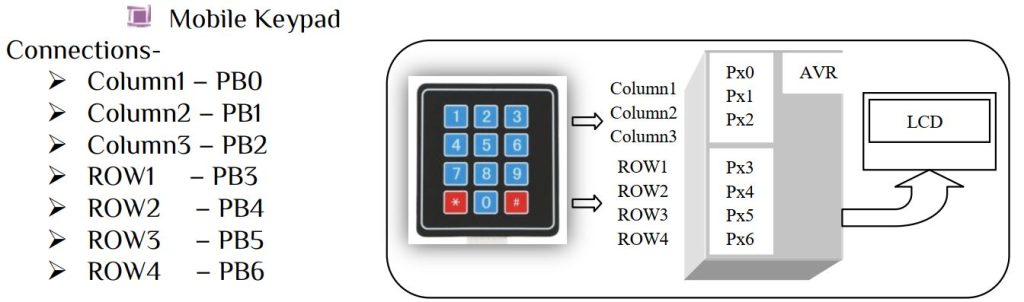
If any switch is pressed it will display that character. C main program-
/************************************************************************************************
*************************************************************************************************
This program will display digit of mobile keypad in LCD display
*************************************************************************************************
		Subeer Kumar Sarkar
		Electrical & Electronic Engineer
************************************************************************************************
************************************************************************************************
***********************************************************************************************/
#include<avr/io.h>
#include<util/delay.h>
#include<stdio.h>
#include"keypad.h"
#include"lcd.h"
char key[3],j;
int main(void)
{
keypad_init();
LCD_INIT();
LCD_Clear();
LCD_write_string(1,1,"Press any key");
_delay_ms(500);
while(1)
{
j=key_press(0x7f);
sprintf(key,"%c",j);
LCD_write_string(1,2,key);
}
return 0;
}


 IoTthingHuB


 Visit Today : 58
 Total Visit : 41174