
In this example we introduce a display contain custom digits and LED indicator. Since STM32 has may GPIO pin we can easily interface LEDs and Seven Segment Display. But in this section we will develop a custom display using Latch Register 74HC595. For the basic of Seven Segment Display & SPI interface with 74HC595 please go through the section we discuss earlier. We will develop part by part. Let’s start with 4 digits Seven Segment Display.
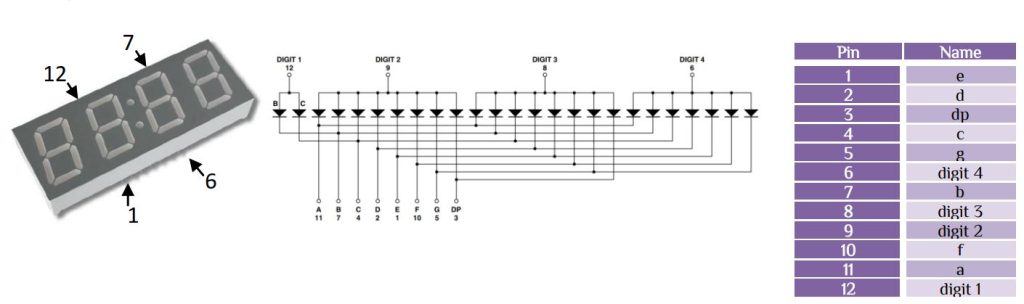
Here we use Common Anode 4 digit Seven Segment Display. If we connect the 74HC595 with the following configuration then-

So that to display 0, bit sends will be 0b11000000. Similarly other digit will be created. After connect Vcc to Pin6 then we see a 0 value shows in digit4 or Vcc to Pin12 digit1 will show 0 value. We have to control the digit with either using GPIO pin or using another 74HC595 latch. We will use another 74HC595 latch register and control the digit[1:4] using persistence of vision. To know more about persistence of vision & how it works just see my illusion article. We use remaining 4 pin to control LEDs to indicate different indicators. Let’s look at the full connection diagram –
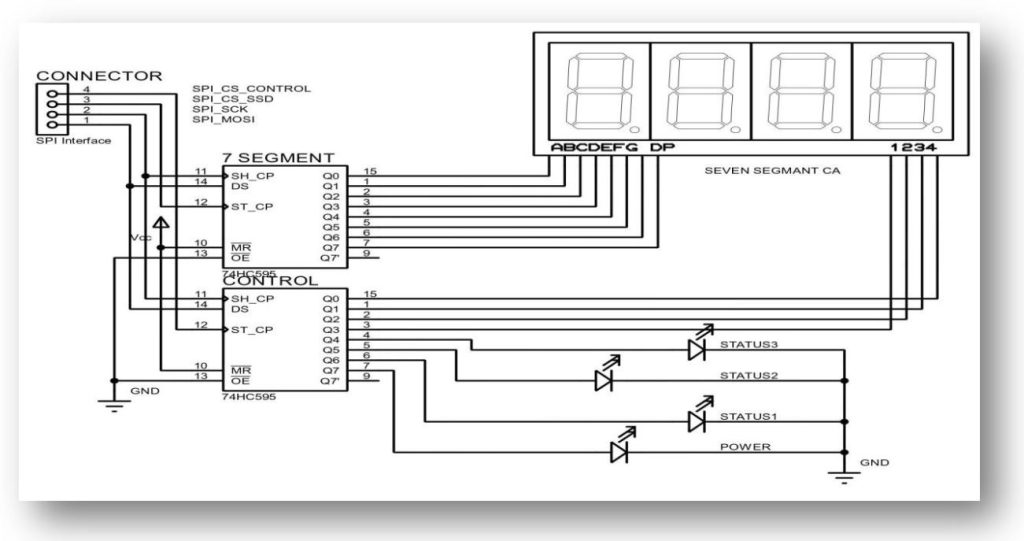
Only 4 pin will use to control the whole display. Make the MR=High and OE= GND. From the shifting logic of 74HC595 we have to do the following function step by step-

Set SPI1 with parameters that need to be changed in STM32 as follow-

Other parameters remain the same. Here we introduce only one function of SPI HAL Library.
HAL_SPI_Transmit(SPI_HandleTypeDef *hspi, uint8_t *pData, uint16_t Size, uint32_t Timeout)
Here, hspi is hspi1, since we initialize SPI1
- pData pointer to data buffer
- Size amount of data to be sent
- Timeout Timeout duration
We use STM320308-DISCO board with GPIO pin PC4 for Seven Segment Display part & pin PC5 for Controlling Part. Suppose we only want to set Q7 pin of CONTROL latch 74HC595, simple code is-
    uint8_t Led[0]= 0b10000000;
    HAL_SPI_Transmit(&hspi1, Led,1,100);
	HAL_GPIO_WritePin(GPIOC,GPIO_PIN_5,GPIO_PIN_SET);
	HAL_Delay(1);
	HAL_GPIO_WritePin(GPIOC,GPIO_PIN_5,GPIO_PIN_RESET);
If we use this function in main.c file then there will be no error, but if we want to make our own segment.c & segment.h file and use the SPI HAL Library, there will be an error of undefined &hspi1. We use global type variable declaration to overcome that error that-
extern SPI_HandleTypeDef hspi1;
We use same void print(unsigned long int num) -> function that we developed in ATmel section with couple of changes. We introduce a new function of –
void LED_ON(uint8_t value)-> to display indicators Please download the driver which contain the segment.c & segment.h file and follow the procedure as shown in the video.
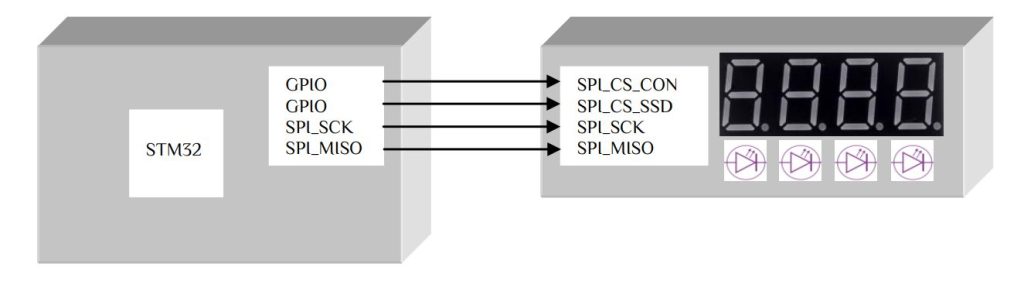
The connection diagram has a simplified model as follow-


 IoTthingHuB


 Visit Today : 58
 Total Visit : 41174