
We already learn LCD interfacing in previous article. LCD Display requires lots of digital I/O pin and the circuit requires more space. In market I2C LCD display are available and the interfacing is not so difficult. You just need to know the hardware interface and the I2C IC which is connected with that LCD. Usually in maximum I2C LCD module use PFC8574A or PFC8574. Both the device has different I2C address. Let’s first look at the internal connection and the changes that need to be changed.
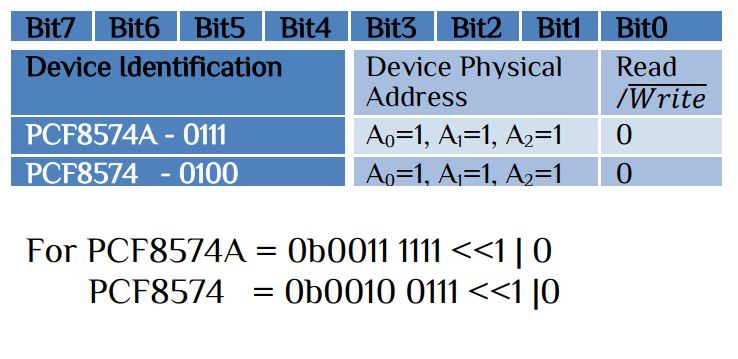
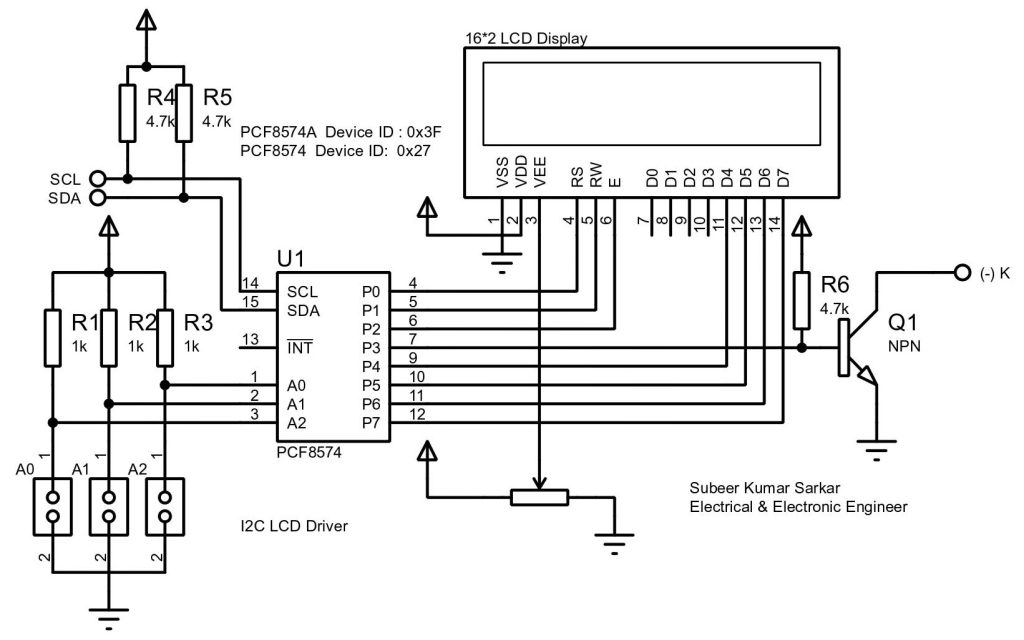
Now it’s time to interface the module with STM32 HAL I2C library. First enable the I2C feature. It automatically call the default settings, you don’t need to change any parameters.
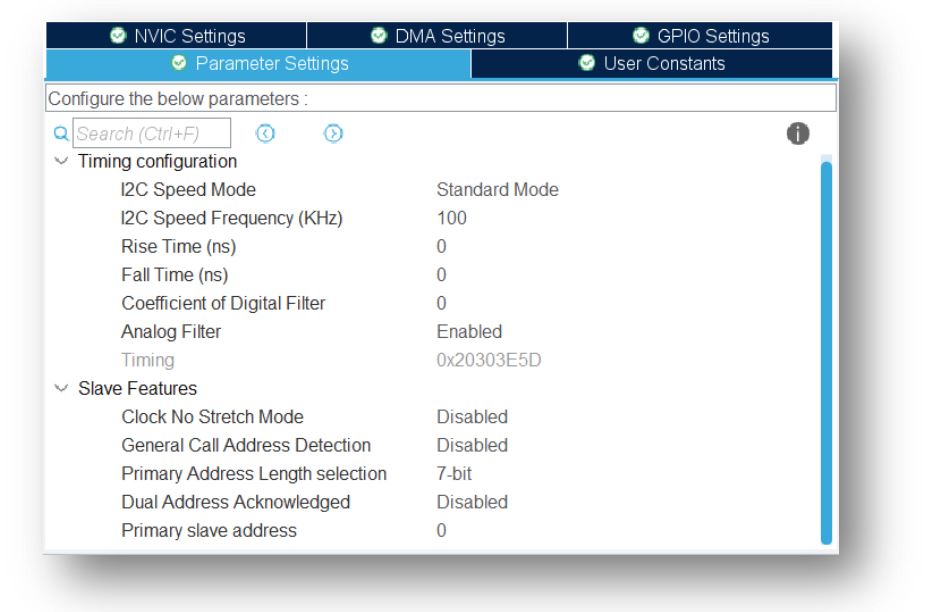
The generated HAL I2C library has different functions. Like-
HAL_StatusTypeDef HAL_I2C_Master_Receive(I2C_HandleTypeDef *hi2c, uint16_t DevAddress, uint8_t *pData, uint16_t Size, uint32_t Timeout);
HAL_StatusTypeDef HAL_I2C_Master_Receive_DMA(I2C_HandleTypeDef *hi2c, uint16_t DevAddress, uint8_t *pData, uint16_t Size);
HAL_StatusTypeDef HAL_I2C_Master_Receive_IT(I2C_HandleTypeDef *hi2c, uint16_t DevAddress, uint8_t *pData, uint16_t Size);
HAL_StatusTypeDef HAL_I2C_Master_Transmit(I2C_HandleTypeDef *hi2c, uint16_t DevAddress, uint8_t *pData, uint16_t Size, uint32_t Timeout);
HAL_StatusTypeDef HAL_I2C_Master_Transmit_DMA(I2C_HandleTypeDef *hi2c, uint16_t DevAddress, uint8_t *pData, uint16_t Size);
HAL_StatusTypeDef HAL_I2C_Master_Transmit_IT(I2C_HandleTypeDef *hi2c, uint16_t DevAddress, uint8_t *pData, uint16_t Size);
Since we just transmit data to the I2C LCD driver, we just deal with one function-
HAL_StatusTypeDef HAL_I2C_Master_Transmit(I2C_HandleTypeDef *hi2c, uint16_t DevAddress, uint8_t *pData, uint16_t Size, uint32_t Timeout);
Here, hi2c is hi2c1 or hi2c2
- DevAddress is the 7 bit physical address + 1 bit R/W
- pData pointer to data buffer
- Size amount of data to be sent
- Timeout Timeout duration
All the user function that we developed in previous article remain same expect 2 functions.
LCD command write function-
  #define  Address 0x27  // if PCF8574
  //#define  Address 0x3F  // if PCF8574A
void LCD_cmd(unsigned char cmd)
 {
    unsigned char data[3];
	data[0]=cmd;
	data[1]=cmd|0b00001100; // EN = 1 and Backlight ON(Pin –P3)
    HAL_I2C_Master_Transmit(&hi2cx,(Address<<1)|0,data,2,100); // x is 1/2 etc
	HAL_Delay(2);
	data[0]=cmd|0b00001000; //EN = 0 and Backlight ON
    HAL_I2C_Master_Transmit(&hi2cx,(Address<<1)|0,data,1,100); // x is 1/2 etc
}
LCD character write function-
void LCD_write(unsigned char data)
 {
    unsigned char display[3];
	display[0]=data;
	display[1]=data|0b00001101; // EN = 1, R/S=1 and Backlight ON
    HAL_I2C_Master_Transmit(&hi2cx,(Address<<1)|0,display,2,100); // x is 1/2 etc
	HAL_Delay(2);
	display[0]=data|0b00001001; // EN = 0, R/S=1 and Backlight ON
    HAL_I2C_Master_Transmit(&hi2cx,(Address<<1)|0,display,1,100); // x is 1/2 etc
 }
If you are using I2C1 or I2C2 please use the following external variable otherwise error occour-
extern I2C_HandleTypeDef hi2c1; or extern I2C_HandleTypeDef hi2c2;
The main program while(1) function remain the same as follow-
        LCD_write_custom(1,1,0);
		LCD_write_custom(2,1,1);
		LCD_write_custom(2,2,2);
		LCD_write_custom(1,2,4);
		LCD_write_custom(5,2,3);
		LCD_write_string(6,2,"IoTthingHuB");
		LCD_write_string(5,1,"        www");HAL_Delay(500);
		LCD_write_string(5,1,"       www.");HAL_Delay(500);
		LCD_write_string(5,1,"      www.i");HAL_Delay(500);
		LCD_write_string(5,1,"     www.io");HAL_Delay(500);
		LCD_write_string(5,1,"    www.iot");HAL_Delay(500);
		LCD_write_string(5,1,"   www.iott");HAL_Delay(500);
		LCD_write_string(5,1,"  www.iotth");HAL_Delay(500);
		LCD_write_string(5,1," www.iotthi");HAL_Delay(500);
		LCD_write_string(5,1,"www.iotthin");HAL_Delay(500);
		LCD_write_string(5,1,"ww.iotthing");HAL_Delay(500);
		LCD_write_string(5,1,"w.iotthingh");HAL_Delay(500);
		LCD_write_string(5,1,".iotthinghu");HAL_Delay(500);
		LCD_write_string(5,1,"iotthinghub");HAL_Delay(500);
		LCD_write_string(5,1,"otthinghub.");HAL_Delay(500);
		LCD_write_string(5,1,"tthinghub.c");HAL_Delay(500);
		LCD_write_string(5,1,"thinghub.co");HAL_Delay(500);
		LCD_write_string(5,1,"hinghub.com");HAL_Delay(500);
		LCD_write_string(5,1,"inghub.com ");HAL_Delay(500);
		LCD_write_string(5,1,"nghub.com  ");HAL_Delay(500);
		LCD_write_string(5,1,"ghub.com   ");HAL_Delay(500);
		LCD_write_string(5,1,"hub.com    ");HAL_Delay(500);
		LCD_write_string(5,1,"ub.com     ");HAL_Delay(500);
		LCD_write_string(5,1,"b.com      ");HAL_Delay(500);
		LCD_write_string(5,1,".com       ");HAL_Delay(500);
		LCD_write_string(5,1,"com        ");HAL_Delay(500);
		LCD_write_string(5,1,"om        w");HAL_Delay(500);
		LCD_write_string(5,1,"m        ww");HAL_Delay(500);
		LCD_write_string(5,1,"        www");HAL_Delay(500);
For display custom character into LCD display please the Build your own custom character article.
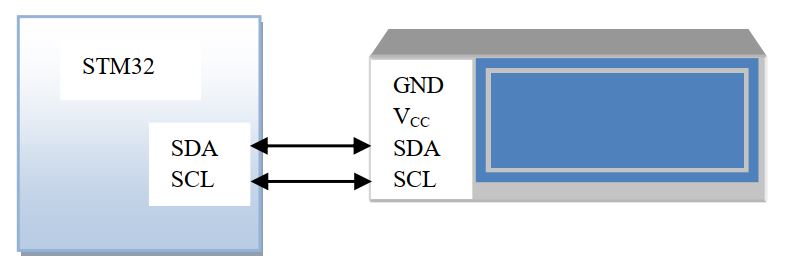
After connect LCD with STmicrocontroller sometime the LCD display shown no contents, in this case vary the variable resistance slowly until the display show characters. The contract adjust is very essential in LCD display so care should be taken. Some time the display may hang reset the mcu then try.


 IoTthingHuB


 Visit Today : 58
 Total Visit : 41174