
Before interface OLED with STM32 microcontroller please go through my OLED section in OLED (SSD1306) interfacing. In this article we interface the low cost 0.91 Inch small OLED. In our previous article we discuss about I2C protocol and I2C LCD driver. STmcu works on 3.3V & I2C LCD works 5V so need DC power level shifter. OLED perfectly works on 3.3V, this is one major advantage of using OLED.
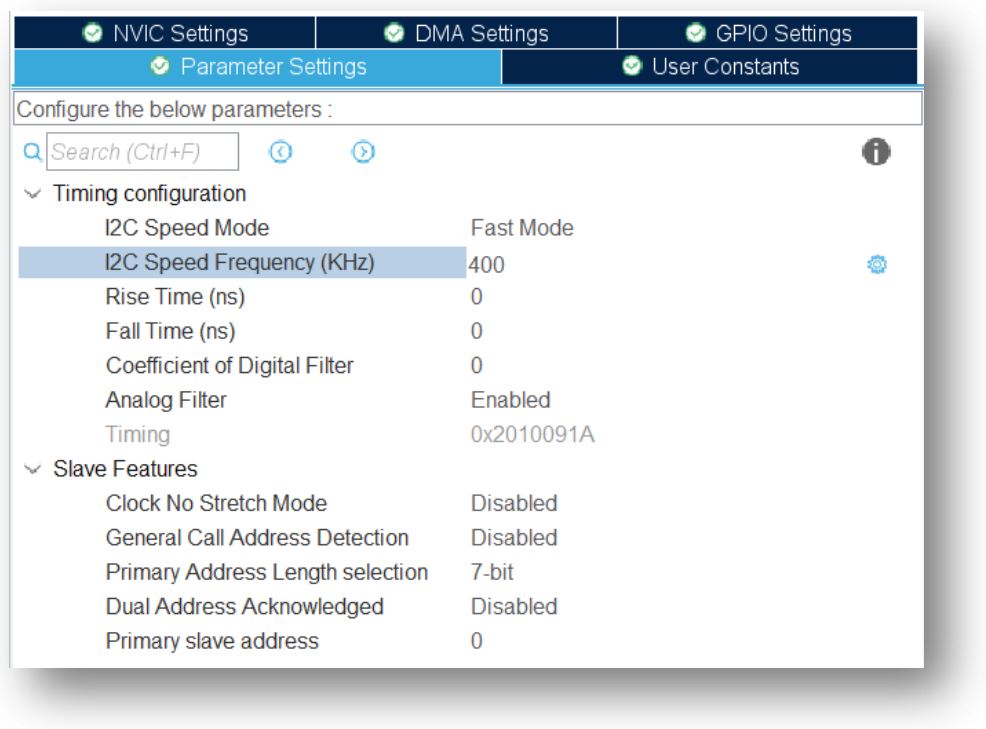
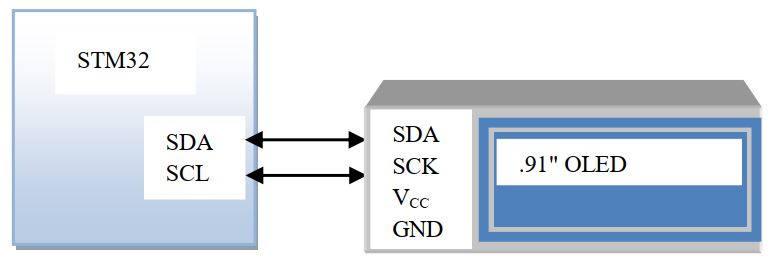
OLED device address: 0x3C
For command mode value is 0x80 and for data mode value is 0x40. The user function as follow-
uint8_t data_stream[3];
extern I2C_HandleTypeDef hi2c2; //I2C definition
void sendcommand(uint8_t com){
data_stream[0]=OLED_COMMAND;
data_stream[1]=com;
HAL_I2C_Master_Transmit(&hi2c2,SLAVE_ADDR_ACC<<1,data_stream,2,100);
}
void SendChar(uint8_t data){
data_stream[0]=OLED_DATA;
data_stream[1]=data
HAL_I2C_Master_Transmit(&hi2c2,SLAVE_ADDR_ACC<<1,data_stream,2,100);
}
Here we used hi2c2 for I2C number 2. Change I2C according to your desire. The pixel location function remain the same as-
void setXY(unsigned char row, unsigned char col)
{
  sendcommand(0xb0+row);                //set page address
  sendcommand(0x00+(8*col&0x0f));       //set low col address
  sendcommand(0x10+((8*col>>4)&0x0f));  //set high col address
}
Since the display is very small and to visualized the front we use 2 pages to display a single character. For example writing ‘B’ will be-
{0x0,0xfc,0xfc,0x8c,0x8c,0xfc,0x78,0x0,0x0,0x3f,0x3f,0x31,0x31,0x3f,0x1e,0x0}
So same changes in the void OLCD_write_string(int X, int Y, char *string) function as follow-
const char ASCCI[][16]= {0x0,0xfc,0xfc,0x8c,0x8c,0xfc,0x78,0x0,0x0,0x3f,0x3f,0x31,0x31,0x3f,0x1e,0x0};
void OLCD_write_string(int X, int Y, char *string)
{
  uint8_t position=0;
  while(*string)
  {
    setXY(X,Y+position);
    for(uint8_t j=0;j<8;j++)
    SendChar((char)ASCCI[*string-0x20][j]);
    setXY(X+1,Y+position);
    for(uint8_t j=8;j<16;j++)
    SendChar((char)ASCCI[*string-0x20][j]);
    *string++;
    position++;
  }
}
Let’s start with OLED with initializing with the following command and after initialize the OLED clear all the pixels by sending 0 to the pixel.
volatile uint8_t OLED_init[] = {0xAE,0xA6,0xAE,0xD5,0x80,0xA8,0x3F,0xD3,0x00,0x40,0x8D,0x14,0x20,0x00,0xA1,0xC8,0xDA,0x12,0x81,0xCF,0xD9,0xF1,0xDB,0x40,0xA4,0xA6,0x2E,0x20,0x00,0xAF};
void init_OLED(void)
{
	for(char i=0;i<=sizeof(OLED_init);i++)
	sendcommand(OLED_init[i]);
}
Download the driver file and let’s start with OLED.


 IoTthingHuB


 Visit Today : 58
 Total Visit : 41174