
In RTC section we interface an I2C IC DS1307. The STM32 has built in RTC. In STM32 the real-time clock (RTC) is an independent BCD timer/counter. The RTC provides a time of-day clock/calendar with programmable alarm interrupt. The RTC includes also a periodic programmable wakeup flag with interrupt capability. Two 32-bit registers contain the seconds, minutes, hours (12- or 24-hour format), day (day of week), date (day of month), month, and year, expressed in binary coded decimal format (BCD). The sub-seconds value is also available in binary format. Compensations for 28-, 29- (leap year), 30-, and 31-day months are performed automatically. Daylight saving time compensation can also be performed. Let’s start with some settings –
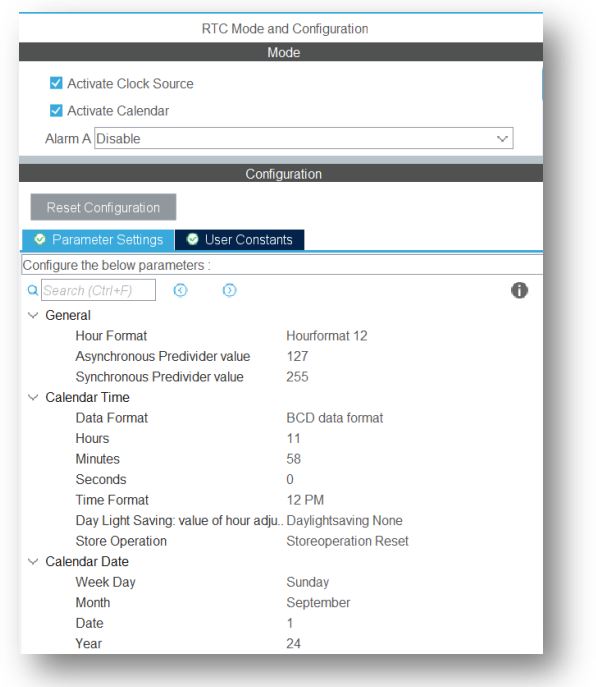

Here we use external crystal 32.768KHz as low speed clock. Change the calendar according to your current time zone. Some useful HAL library as follow-
HAL_RTC_SetTime(RTC_HandleTypeDef *hrtc, RTC_TimeTypeDef *sTime, uint32_t Format)
HAL_RTC_SetDate(RTC_HandleTypeDef *hrtc, RTC_DateTypeDef *sDate, uint32_t Format)
HAL_RTC_GetTime(RTC_HandleTypeDef *hrtc, RTC_TimeTypeDef *sTime, uint32_t Format)
HAL_RTC_GetDate(RTC_HandleTypeDef *hrtc, RTC_DateTypeDef *sDate, uint32_t Format)
Here the format is either
- RTC_FORMAT_BIN: Binary data format
- RTC_FORMAT_BCD: BCD data format
First we have to declare the time & date then assign the value and get the value. To define time & date as follow-
RTC_TimeTypeDef sTime;
RTC_DateTypeDef sDate;
In STM32Cube we can directly assign the date & time, but is not good practice. Let’s assign some value to RTC-
sTime.Hours = 0x10;
sTime.Minutes = 0x0;
sTime.Seconds = 0x0;
sDate.WeekDay = RTC_WEEKDAY_SATURDAY;
sDate.Month = RTC_MONTH_SEPTEMBER;
sDate.Date = 0x1;
sDate.Year = 0x24;
HAL_RTC_SetTime(&hrtc,&sTime,RTC_FORMAT_BCD);
HAL_RTC_SetDate(&hrtc,&sDate,RTC_FORMAT_BCD);
Reading procedure is very simple. Just use 2 lines-
HAL_RTC_GetTime(&hrtc,&sTime,RTC_FORMAT_BCD);
HAL_RTC_GetDate(&hrtc,&sDate,RTC_FORMAT_BCD);
All parameter returns in BCD format, just use %X in C language. The day & time zone as follow-

For example to display all date & time as follow-
char display_time[16]="IoTThingHuB.com ";
volatile char *day_name[8]={"Mon", "Tue", "Wed", "Thu", "Fri", "Sat","Sun"};
volatile char *day_zone[2]={"AM", "PM"};
sprintf(display_time," %02X:%02X:%02X %s",sTime.Hours,sTime.Minutes,sTime.Seconds,day_zone[sTime.TimeFormat]);
sprintf(display_time," %02X/%02X/%02X %s",sDate.Date,sDate.Month,sDate.Year,day_name[sDate.WeekDay-1]);
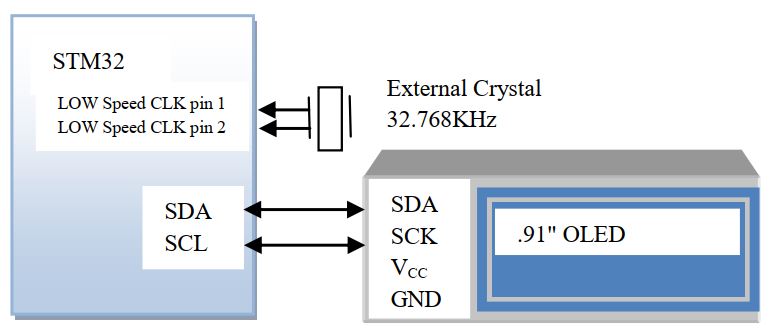
In our previous article we discuss abut OLED interfacing, we will show the clock in OLED. The main program as follow(only the add parameter)-
#include "ssd1306.h"
RTC_TimeTypeDef sTime;
RTC_DateTypeDef sDate;
char display_time[16]="IoTThingHuB.com ";
volatile char *day_name[8]={"Mon", "Tue", "Wed", "Thu", "Fri", "Sat","Sun"};
volatile char *day_zone[2]={"AM", "PM"};
init_OLED();
clear_display();
OLCD_write_string(0,0," Real Time Clock");
While(1){
	HAL_RTC_GetTime(&hrtc,&sTime,RTC_FORMAT_BCD);
    HAL_RTC_GetDate(&hrtc,&sDate,RTC_FORMAT_BCD);
    sprintf(display_time," %02X:%02X:%02X %s",sTime.Hours,sTime.Minutes,sTime.Seconds,day_zone[sTime.TimeFormat]);
	OLCD_write_string(4,0,display_time);
	sprintf(display_time," %02X/%02X/%02X %s",sDate.Date,sDate.Month,sDate.Year,day_name[sDate.WeekDay-1]);
	OLCD_write_string(6,0,display_time);
}


 IoTthingHuB


 Visit Today : 58
 Total Visit : 41174