In our previous article we discuss about ESP8266 as station mode to connect with internet. In this article we display real time Exchange Rate in BDT (Bangladeshi Taka). For connecting with internet please see my previous article. In this section we show the data using 1.8 ” TFT Full Color LCD Module (ST7735 Driver). Before starting please go through my Graphical LCD article in SPI section. Let’s see the pinout-
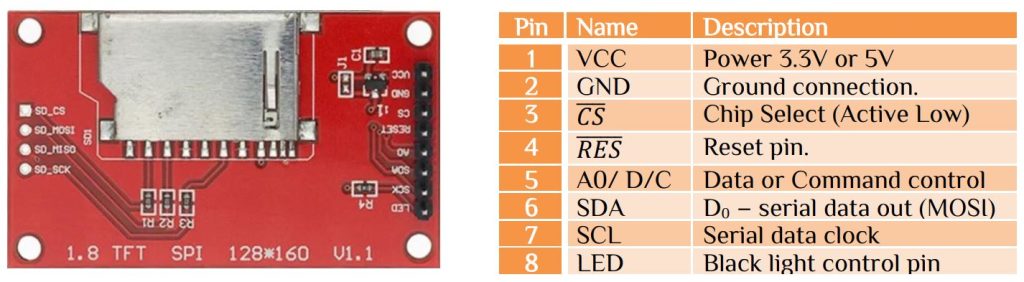
Here the TFT LCD can works with 3.3V in SPI configuration. We need 3 more GPIO pin for CS (Chip Select), Reset & Data or Command mode. Since there is no need for read from the LCD we configure SPI as Half Duplex Master mode. So MISO pin can be used as a GPIO pin. ESP8266 setup will be same as previous article. For Real Time Exchange Rate reading we read data from –
- https://www.nrbbankbd.com/ – Website
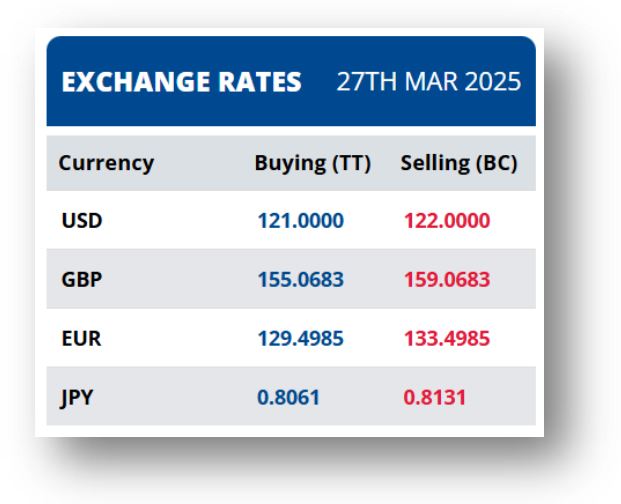
Here we use ThingHTTP service from thingspeak cloud. Create a new ThingHTTP service & copy the XPath from nrbbankbd Bank for that particular section. Please see my Youtube tutorial for full details. Here we use Timer Interrupt function for reading the-
- Time every 60 seconds
- Exchange rate every 60 minutes
Connecting with ThingSpeak cloud is same as connecting with time zone as we discuss in previous article. For example-
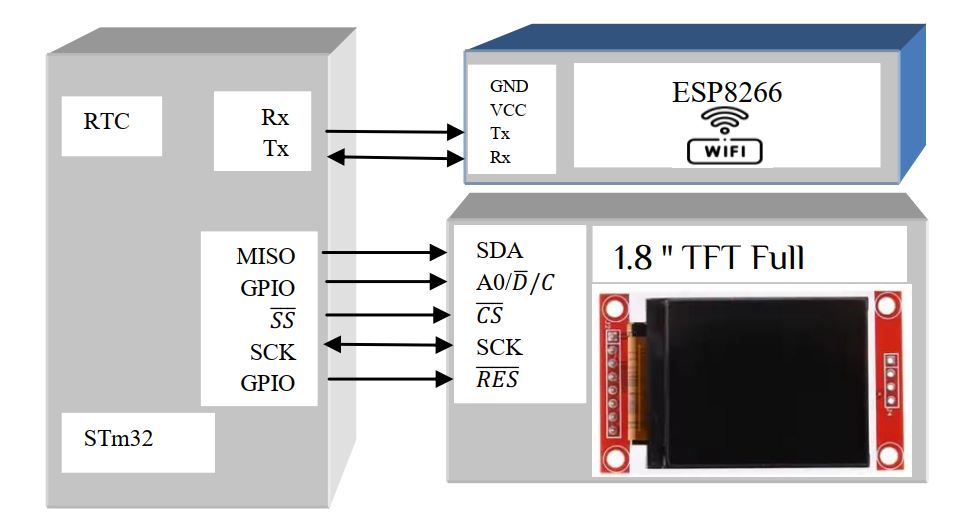
Filter your desire section, Here in display we show all the data in the TFT display. Below is the connection diagram-


 IoTthingHuB


 Visit Today : 58
 Total Visit : 41174