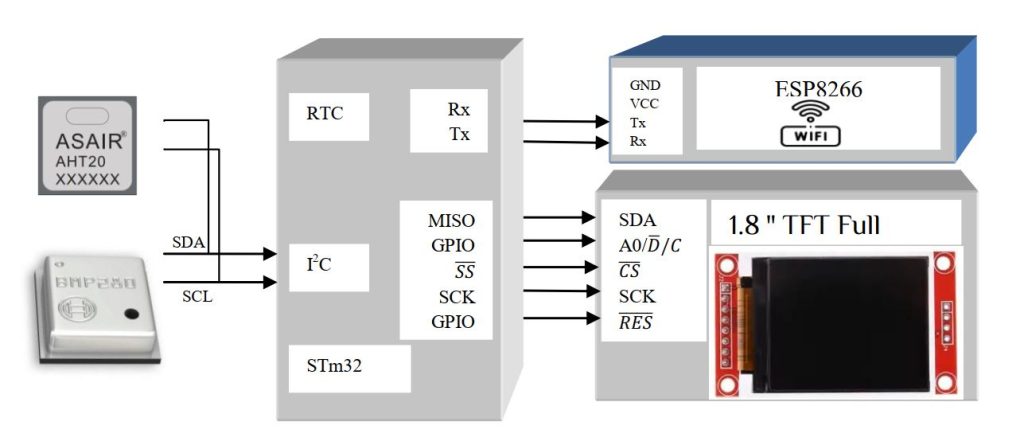
We already learn about ESP8266 softAccess mode to connect with internet. In this article we make a program to store indoor room temperature, pressure, humidity & altitude to the thingSpeak cloud. Go to thingSpeak website & create a channel after successful registration. Since we only write data to thingSpeak cloud, after successfully creating a channel with fields you can have-
Write a Channel Feed
GET https://api.thingspeak.com/update?api_key=={API key}&field1=0
Since it is a GET method we can check it directly into a browser for updating the value without Postman Application. Here we use BMP280 & AHT20 I2C sensor for reading temperature, pressure, humidity & altitude. To know how to interface with BMP280 & AHT20 please go through my I2C weather forecasting article. Only BME280 can display temperature, humidity, pressure & altitude value but for comparing reading we use 2 sensors, also it has low cost them BME280 or you can use only AHT20 for temperature & humidity reading. You can use only 1 GPIO pin & read temperature & humidity data using DHT11 or DHT22. You can make a simple project with only ESP8266 module interface with DHT11 or DHT22 since it has 2 GPIO pin. We will discuss it on some other article, let’s continue with our project. Here
- field1 = Temperature AHT20 & field2 =Temperature BMP280
- field3 = Humidity AHT20
- field4 = Pressure BMP280
- field5 = Altitude BMP280
Download the file of my I2C weather forecasting article & make a simple command for sending data to thingSpeak-
sprintf(wifi_send,”AT+CIPSTART=\”TCP\”,\”api.thingspeak.com\”,80\r\n”);
ESP8266_TX(wifi_send,”CONNECT”,200);
sprintf(wifi_send,”GET /update?api_key=%s&field1=%.2f&field2=%.2f&field3=%.2f&field4=%.2f&field5=%.2f HTTP/1.1\r\nHost: api.thingspeak.com\r\n\r\n\r\n”, API_Key_thingspeak, AHT20_Temperature, BMP280_Temperature, AHT20_Humidity, BMP280_Pressure, BMP280_Altitude);
sprintf(TX_ID,”AT+CIPSEND=%d\r\n”,strlen(wifi_send));
ESP8266_TX(TX_ID,”>”,100); // Creating LINK
sprintf(wifi_send,”GET /update?api_key=%s&field1=%.2f&field2=%.2f&field3=%.2f&field4=%.2f&field5=%.2f HTTP/1.1\r\nHost: api.thingspeak.com\r\n\r\n\r\n”, API_Key_thingspeak, AHT20_Temperature, BMP280_Temperature, AHT20_Humidity, BMP280_Pressure, BMP280_Altitude);
HAL_UART_Transmit(&huart1,(uint8_t*)wifi_send,strlen(wifi_send),1000);
Since the data will not update every seconds we will update it in every 5 minutes. For that purpose we use TIM17 interrupt function. Here we use 1.8 ” TFT LCD display for display sensor data. Sensor value will update every minutes. Let’s use another format of current local server time data form https://timezonedb.com. No need for internal RTC clock & data will synchronize with server every time.
All the data will store in thingSpeak server (for free account update available every 15s) & you can read it any time. For device setting & how it works please see my YouTube video, keep learning.


 IoTthingHuB


 Visit Today : 58
 Total Visit : 41174